
Hailuo Al: Image&Video Maker
Screenshots
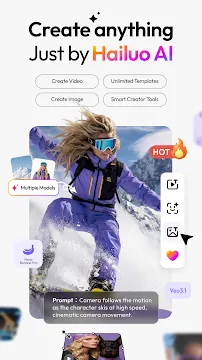
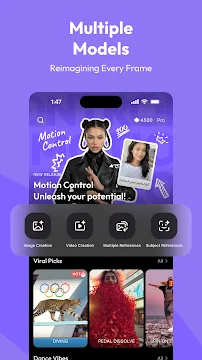
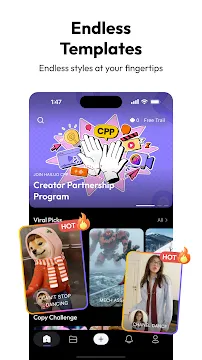
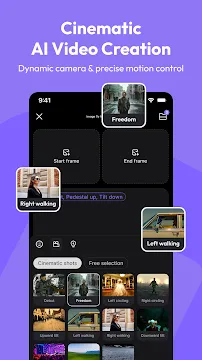
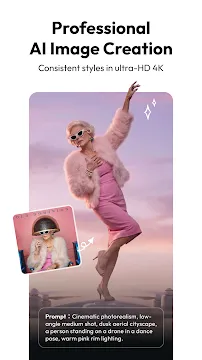
Hailuo AI changes the way mobile creators make visual content. This modern app allows you to generate videos easily. You can transform your text ideas into stunning moving pictures. Furthermore, you do not need complex editing skills to use it. Users can simply type a prompt to start the creative process. Then, the advanced artificial intelligence tools handle the heavy work. You will get high-quality videos within a few minutes. Therefore, anyone can become a content creator instantly. This app provides amazing tools for social media fans. It also helps marketers who need quick videos. You can express your creativity on your phone right now.
Many people want to make engaging media for their online platforms. However, traditional video editing takes a lot of time. It requires expensive software and strong computers. Hailuo AI solves this problem completely for mobile users. You can download the App to your mobile device quickly. Because it runs smoothly, you get fast rendering times. The system uses smart deep learning models to understand human language. Consequently, your text prompts turn into highly accurate visual scenes. You can create realistic human faces or fantasy worlds. This App gives everyone the tools to tell beautiful stories.
What is Hailuo AI
Hailuo AI is a modern artificial intelligence tool created by MiniMax. This App focuses on quick video and image generation from simple inputs. For example, you can give it a short sentence or a photo. Then, the App creates high-definition video clips within minutes. The core system relies on advanced neural networks to process visual data. Therefore, the outputs look highly realistic and clean.
Many mobile users enjoy this tool because it offers absolute creative freedom. You do not need to buy expensive cameras to film a movie. Instead, you write down your vision in the text box. The App interprets your text and adds natural movements. Additionally, it matches the emotional expression of characters perfectly. This feature makes your storytelling much more effective.
Important Note: MiniMax built this tool to make mobile video generation faster. The rendering happens entirely on remote servers to ensure top speed.
The development team regularly updates the software to fix bugs. As a result, the user interface remains smooth and fast. You can explore different artistic styles with ease. For instance, you can choose a cinematic style or an animated look. The App caters to diverse aesthetic preferences across the world. It provides a helpful option for anyone who loves digital art.
Creative Features of Hailuo AI
Creative features of Hailuo AI allow you to build magnificent media files. The software includes several tools that enhance your workflow. First, the text-to-video tool changes scripts into stunning scenes. You can describe a raining city at night. Then, the App generates a five-second clip with realistic raindrops. Second, the image-to-video feature animates your static photos. You can upload a portrait of your friend. After that, the App adds subtle facial movements and eye blinks.
Moreover, the App supports specialized motion control settings. You can guide the virtual camera easily. For example, you can select camera paths like pan, tilt, or zoom. This gives your clips a professional cinematic feel. Furthermore, the newly added AI Ad Generator helps business owners. You can upload a simple product picture. Consequently, the App generates multiple video advertisements automatically.
Here is a list of the main features you can explore:
- Text to video generation with deep text interpretation.
- Image animation with fluid and realistic motion effects.
- Character reference tools to keep faces consistent.
- Advanced camera controls including pan and zoom adjustments.
- Multilingual prompt processing for global users.
- High-definition output up to 1080p resolution.
These options help you create unique social media posts. You can share your creations on TikTok or Instagram instantly. Because the rendering happens on cloud servers, your phone stays cool. You will save a lot of battery power while creating high-quality work.
How to Generate Content in Hailuo AI
Learning how to generate content in Hailuo AI takes very little time. The interface is clean and user-friendly for beginners. First, you need to open the App on your mobile device. Then, you choose your preferred creation method on the home screen. You can select either text input or image upload. If you choose text, type a descriptive prompt in the box. Be specific about the characters, background, and lighting.
Next, you can adjust the customization options. For instance, you can select the desired aspect ratio for your video. The App offers square, vertical, and horizontal formats. Therefore, you can match the size requirements of various social media sites. You can also apply specific style filters like sci-fi or vintage film. After setting these options, press the generate button.
The cloud system processes your request rapidly. Usually, the generation takes less than two minutes. Then, the preview allows you to see the final video clip. If you like the result, save it to your phone gallery. However, you can also modify your prompt if you want changes. This simple workflow allows you to experiment continuously without stress.
Why Mobile Content Creators Love Hailuo Al
Mobile content creators often look for tools that save time. Hailuo AI meets this need perfectly by streamlining production. For example, editing a traditional video requires complex timeline management. This App removes that difficulty completely. You can produce high-quality clips while riding the bus or waiting in line. Therefore, it fits perfectly into a busy modern lifestyle.
Additionally, the App offers an excellent subject reference tool. This tool solves a major issue in artificial intelligence art. Usually, characters change their looks between different video renders. However, this feature allows you to maintain consistent character appearances. You upload a reference photo of your character first. Then, the App keeps the same face across multiple scenes. This is highly useful for people who create multi-part stories.
Pro Tip: When you use the subject reference feature, choose photos with clear lighting. This practice ensures the highest level of facial consistency across frames.
Furthermore, the software handles emotional expressions remarkably well. Characters can show joy, sadness, or anger naturally. As a result, your videos feel much more professional and engaging. You can build a loyal audience by posting these compelling clips. The App gives independent creators a fair chance to compete with large studios.
Conclusion
Hailuo AI represents a massive leap forward in mobile content creation technology. This App makes video generation accessible to everyone everywhere. You no longer need expensive hardware or professional training to make movies. Instead, you can rely on your imagination and simple text prompts. The software transforms these inputs into beautiful, smooth video clips within minutes. Therefore, it changes how we share stories online.
Many users appreciate the continuous updates from the developer team. These updates keep the system stable and introduce exciting new options. For example, the new outfit swap and ad generator tools expand your creative possibilities. You can easily design marketing campaigns or fun social media posts on your phone. Because the app uses cloud rendering, it does not slow down your device.
In summary, this tool provides an incredible experience for modern digital artists. It combines powerful neural networks with a simple, clean interface. You can download the App today to begin your creative journey. Explore the tools, experiment with prompts, and see your ideas come to life. Your next viral video is just a few clicks away.